
Search
Weavestream provides full-text search across all documentation content — articles, assets, and uploads — backed by PostgreSQL's native tsvector indexing.
How It Works
A denormalised SearchIndex table maintains indexed documents for every searchable entity. When an article, asset, or upload is created or updated, the worker re-indexes the relevant content into this table.
Each index record stores:
- A plaintext representation of the content
- A
tsvectorblob (pre-computed by Postgres) - Field weights (title: A, body: B)
- Entity type, ID, and tenant scoping
Queries run against the tsvector column with GIN indexing for fast lookups.
Scope & Visibility
Search results are always scoped to the requesting user's accessible tenants. A user cannot find records from a tenant they are not a member of. Additionally:
- Fields marked
visibleToClients=falseare stripped from client portal results - Archived entities are excluded from search results
Command Palette
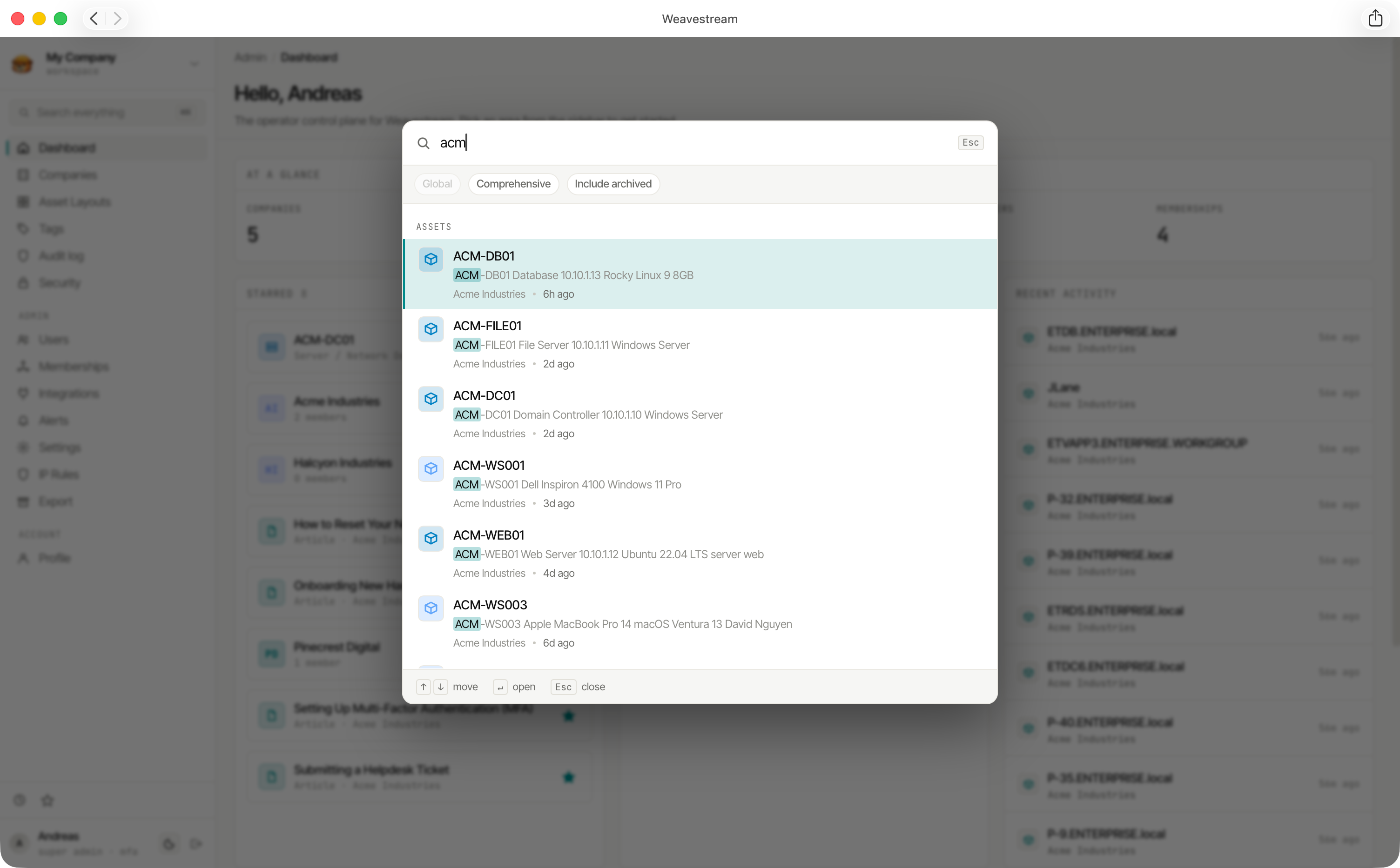
Press Cmd+K (macOS) or Ctrl+K (Windows/Linux) anywhere in the admin interface to open the command palette.
The command palette searches across:
- Articles
- Assets
- Companies (tenants)
Per-user toggles
Each user can configure the command palette behaviour from their profile:
Indexed Content
Rich-text content (Tiptap JSON) is converted to plaintext before indexing.